




Even though caller-ID can tell you who’s calling, there are times when you may not be sure you want to talk to the person on the other line. If you find yourself debating between picking up the phone and possibly getting trapped in an unwanted conversation, or letting the call go to voicemail and possibly feeling guilty for ignoring it, then voicemail monitoring is here to help. With voicemail monitoring you can listen to messages as they are being left. If you decide you want to take the call after hearing what they have to say, then pick up your phone and you’ll be automatically connected.
- Table of Contents
What is voicemail monitoring and how does it work?
Voicemail monitoring allows you to listen to voicemail messages as they’re being left, just as you might with a traditional answering machine. Any time a missed call rolls to voicemail, the speaker of any Ooma device that rang when the call came in — your Ooma Telo Base Station or Phone Genie, and any Ooma HD3 Handsets, HD2 Handsets, or Scouts you may have — will turn on. You’ll be able to hear your own voicemail prompt, and then the caller leaving their message. Similar to a traditional answering machine, you can choose to pick up your phone at any time while the caller is leaving the message to accept the call and start chatting. By default, voicemail monitoring is enabled.
How do intercept a call that I want to answer?
You can intercept a call that you want to answer by picking up the phone! If you pick up while the caller is still leaving their message, the call will be connected normally, the voicemail recording will be stopped, and the speakers on your Ooma devices will turn off so that you may take the call in private.
Can I disable voicemail monitoring?
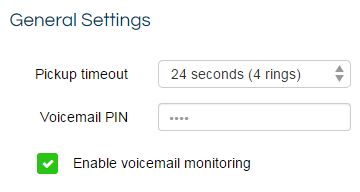
You can disable voicemail monitoring by following these steps:
- Log into My Ooma and navigate to Voicemail under the Preferences tab
- Under Broadband Answering Machine, uncheck the box next to “Enable Voicemail Monitoring,” as shown below: \
Is voicemail monitoring available to all users?
No. Voicemail monitoring is available only to Ooma Premier subscribers.
I have voicemail forwarding enabled, but I can’t hear people leaving messages. What’s going on?
Your first step should be to ensure that the speaker volume on your device is not set to silent. You can do this by pressing the volume button (  ) on your Telo Base Station or Phone Genie or turning the volume control knob on the left side of your Ooma Hub or Ooma Scout, or by pressing the Up cursor on the navigation key of your Ooma HD3 Handset, or Ooma HD2 Handset.
You can test the volume of the Ooma device by pressing the (  ) button and making sure you can hear your voicemail on your Ooma Telo Base Station or Phone Genie. You can also test this by making an incoming call to your Ooma HD3 Handset or Ooma HD2 Handset and listening to the ring.
Will voicemail forwarding work while my phone is in Do Not Disturb mode?
No, when Do Not Disturb mode is enabled, incoming calls are directly sent to voicemail and will not be screened aloud on the speaker.
Reference: You can learn more about Do Not Disturb by reviewing our FAQ.