


Thank you

Thank you!

An Ooma Office Sales Representative will be in touch shortly.

If you do not receive the call within a few minutes, please call: 877-353-5185

Popup images

Let’s talk!

One of our knowledgeable representatives is standing by to provide recommendations and help you get started. Just call 877-621-0515 or click this CHAT button. Or, fill out this form and someone will reach out to you shortly.

Start with area code, not country
By clicking below you expressly agree to and acknowledge the statements set forth in this
link. By submitting your contact information, you are giving express written consent to receive on your telephone, mobile or other electronic device auto-dialed, pre-recorded, artificial or other automated telemarketing calls or texts (SMS & MMS) from Ooma, its marketing partners, or third parties acting on Ooma’s behalf, even if your number is a on a corporate, state or federal Do Not Call (DNC) list. Carrier fees may apply. Consent is not a condition of purchase. It also indicates that you agree to Ooma’s Privacy Policy.
Fix error
Spectacular Spring Specials for Small Businesses! Call 877-353-5185 today.
All systems are 100% operational.

Do I need to buy a new Wi-Fi router to use with Ooma Connect?

Last Updated: March 2, 2026

Your business probably already has a Wi-Fi router in use today. In some cases, you can re-use your existing router to install Ooma Connect. In other cases, you may need to purchase a new router. If you need to purchase a new router, we have a few recommendations to help you get started.

Router and modem are separate devices

If your existing Wi-Fi router is separate from your Internet Service Provider’s (ISP’s) modem, as shown in the diagram below, then you can use it with Ooma Connect. This is usually the case if you purchased the router yourself. Third-party routers are commonly made and sold by Netgear, Linksys, TP-Link, Eero, Orbi, Google Wi-Fi, Asus, and more.
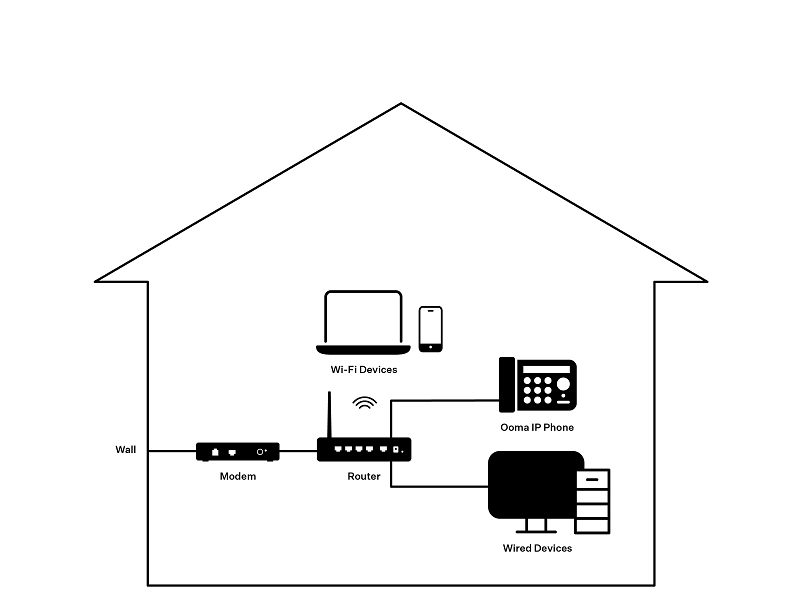
layout one

Router and modem are combined into one device

If your current Wi-Fi router is combined with the ISP’s modem, as in the diagram below, you will need to purchase a new router to use with Ooma Connect.
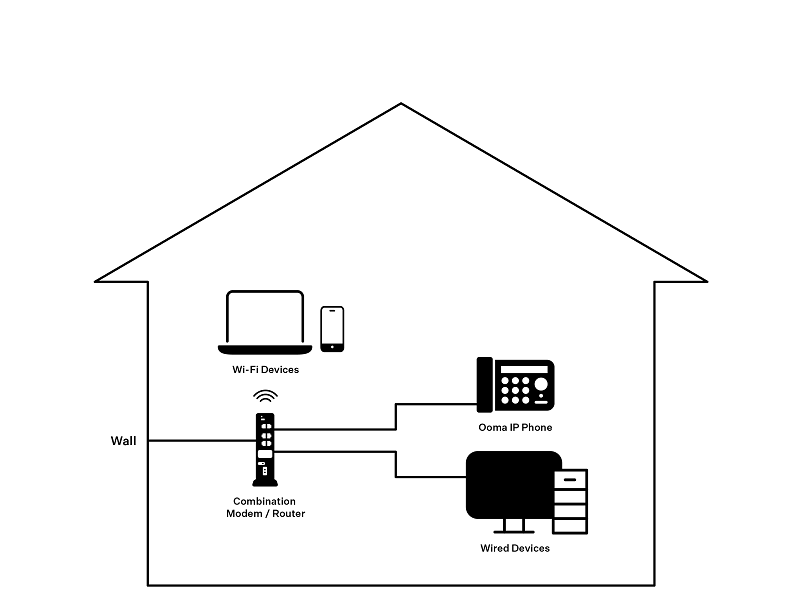
layout two

Once you have determined which Wi-Fi router to use, you will want to connect it to the LAN port of the Ooma Connect base station, as outlined in this article.