


Thank you

Thank you!

An Ooma Office Sales Representative will be in touch shortly.

If you do not receive the call within a few minutes, please call: 877-353-5185

Popup images

Let’s talk!

One of our knowledgeable representatives is standing by to provide recommendations and help you get started. Just call 877-621-0515 or click this CHAT button. Or, fill out this form and someone will reach out to you shortly.

Start with area code, not country
By clicking below you expressly agree to and acknowledge the statements set forth in this
link. By submitting your contact information, you are giving express written consent to receive on your telephone, mobile or other electronic device auto-dialed, pre-recorded, artificial or other automated telemarketing calls or texts (SMS & MMS) from Ooma, its marketing partners, or third parties acting on Ooma’s behalf, even if your number is a on a corporate, state or federal Do Not Call (DNC) list. Carrier fees may apply. Consent is not a condition of purchase. It also indicates that you agree to Ooma’s Privacy Policy.
Fix error
Spectacular Spring Specials for Small Businesses! Call 877-353-5185 today.
All systems are 100% operational.

Setting up Ooma Connect as a backup Internet connection

Last Updated: March 2, 2026

Perfect for customers who want maximum uptime through the combined power of Ooma Connect and their existing Internet service, Ooma Connect can be installed as a backup connection.

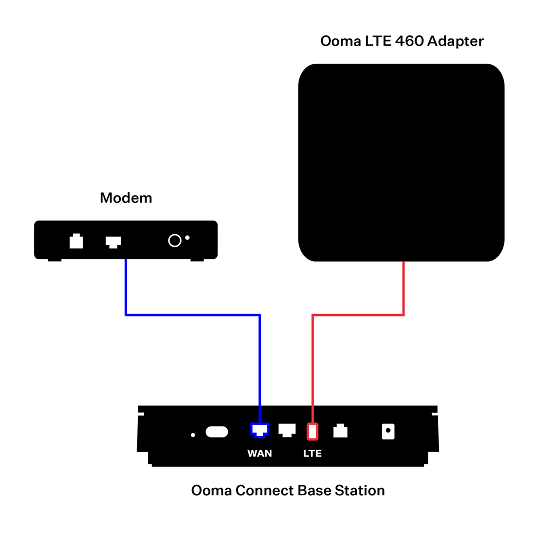
You will want to begin by connecting your current ISP’s modem or router to the WAN port on the back of the Ooma Connect Base Station. Connect the Ooma LTE 460 Adapter to the LTE port on the back of the Ooma Connect Base Station. Your setup should look something like this:
backup

Be sure to reboot your modem after you connect it to the WAN port.

This setup allows Ooma to act as a failover data provider in the event that your primary ISP goes down. Internet data will be sent through your primary ISP by default and will only be sent via the Ooma connection if the primary connection is unavailable. Telephone calls will be sent via both connections and the best packet will be used to create the clearest call possible.

Once you have set up the Ooma Connect Base Station, you will need to connect it to your computers, telephones, and other Internet-connected devices by following the instructions in this article.