



Last Updated: March 2, 2026
As you are setting up Ooma Connect, you may face a challenge where the best location for the Ooma LTE 460 adapter is far away from the location of your router or your existing ISP equipment. There are two options to resolve this situation:
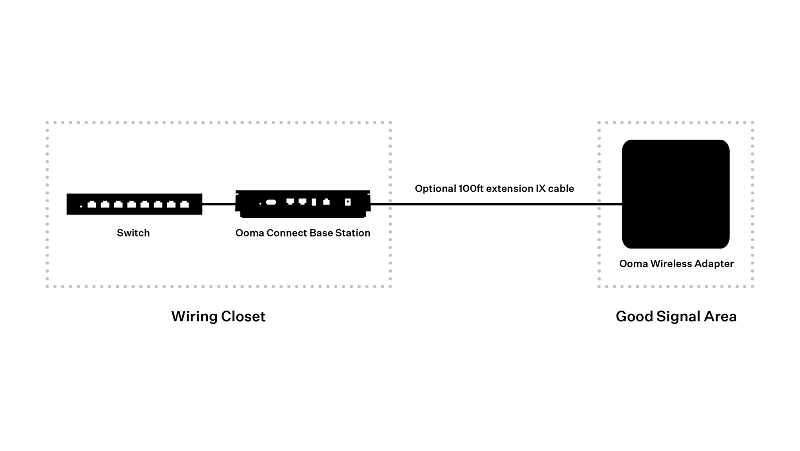
- If the distance is under 100 ft, you can purchase the option 100 ft extension cable for Ooma Connect. Place the Ooma Connect Base Station near your existing router (possibly located inside a wiring cabinet). Use the Ooma Connect app to help you place the antenna in the optimal location. Run the extension cable (sold separately) between the Ooma Base Station and the LTE adapter antenna. This is the preferred soluton if you are using Ooma Connect as a supplementary backup connection with your existing ISP as the primary connection.
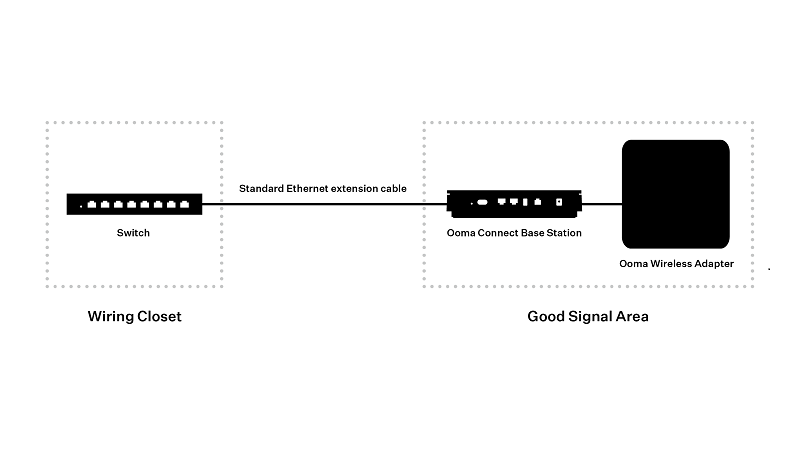
- Alternatively, you can keep the Connect Base Station near the LTE adapter antenna. Run a standard Ethernet extension cable with RJ45 connectors (sold separately) from the LAN port of the Base Station to the modem or router’s location (possibly a wiring cabinet). This solution will work up to a distance of 300 feet. If you are using Ooma Connect as a supplementary backup connection, you will also need to run a long Ethernet cable between your existing ISP’s moedem and the WAN port on the back of the Ooma Connect Base Station.\
You may want to check out our instructional video for more information.