


 Introducing
  ,
, 



If you’ve picked out a personal phone number for your home office or your teenager, you’ll probably want to know which phone number the caller is trying to reach before you go running for the phone. With Ooma custom ring patterns, you can set your phones to ring in a certain way depending on which number the caller dialed. Great for multi-person households, custom ring patterns are designed to help you know who the call is for before you ever see the caller ID — so you can grab it if it’s for you, and let it go to voicemail if it’s not!
- Table of Contents
What are custom ring patterns? How do I get started?
Custom ring patterns allow you to assign different ring tones to different phone numbers. You might want to make use of custom ring patterns in any situation where you have multiple phone numbers that will ring the same phone. Customers with only one phone number can also use custom ring patterns to assign a different ring tone to their incoming calls.
If you’d like to set up a custom ring pattern for one or more of your phone lines, you can do so by following these instructions:
- Log into your My Ooma account navigate to Phone Numbers under the Preferences tab
- Click on the settings button (
 ) phone number you’d like to manage and select “Edit number”
 -
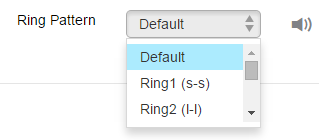
A pop-up window will appear. Select your preferred ring pattern from the list as shown below: \
-
Save your changes
Once you have completed these steps, your phone or phones will ring in the pattern you have selected for all incoming calls from that phone line.
How can I preview what the different ring tones sound like?
You can hear the way the different ring tones sound by selecting them from the dropdown menu as described above, and clicking on the  icon.
icon.
What does the Default ring tone sound like?
The Default ring tone is the standard ring pattern on phone lines: 2 seconds of ringing and 4 seconds of silence.
Can I make my own custom ring pattern?
No. Ooma does not support personalized custom ring patterns.
Who can use custom ring patterns?
Ooma Premier customers can customize their ring patterns for each number. If additional phone numbers are added, a ring pattern can be set for each number.