


 Introducing
  ,
, 



The Ooma DP1 desk phone is a multi-line analog phone that is perfect for your home office. It has been designed to integrate completely with Ooma, including one-touch access to many Ooma Premier features like Do Not Disturb and the Instant Second Line. Increase your productivity while enjoying beautiful HD voice call quality.
What’s in the box?
You should have the following equipment in the box: * Desktop phone * Handset and cord * Deskset stand * A/C power adapter * Backup battery * Quick Start Guide * Shortcut guide * Directory card
What do I need to use my Ooma DP1 desk phone?
You need to have a working Ooma Telo Base Station or Phone Genie unit set up to use the Ooma DP1 desk phone.
How do I set up my Ooma DP1 desk phone?
Begin by installing the included backup battery and assembling the phone stand to your preferred height. Plug the phone in using the included power adapter.
To pair the DP1 desk phone, press the PAGE button on the Telo Base Station or Phone Genie for three seconds to initiate registration mode. The PAGE button is either on the back or the top-right corner of your device, depending on which version of the device you have (see below):
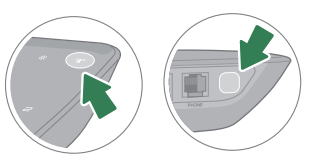
You will hear a voice confirmation from the Telo Base Station or Phone Genie, and within a few seconds the DP1 desk phone should ask you if you wish to pair it with your Ooma Telo Base Station or Phone Genie. Press the YES soft key on the handset to complete the registration process. The first time you pair your handset to your Telo Base Station or Phone Genie, the handset may need to download a software upgrade. Follow the directions on the handset screen. This will take a few minutes.
When you see the desk phone’s display change to the home screen, it is ready to be used. You should now be able to pick up the phone and hear the musical Ooma dial tone.
How many DP1 desk phones can I have registered with my Telo Base Station or Phone Genie?
Each Ooma Telo Base Station or Phone Genie can support up to four Ooma cordless peripherals (DP1 desk phones, HD2 Handsets, or Linx devices).
Can I use both a DP1 desk phone and regular analog phones with my Ooma Telo Base Station or Phone Genie?
Yes! You can plug a regular phone into the PHONE port on the back of your Ooma Telo Base Station or Phone Genie and then set up as many as four wireless Ooma peripherals around your home to have a total of five phones.
Can I use both a DP1 desk phone and other wireless Ooma accessories with my Ooma Telo Base Station or Phone Genie?
Yes! Each Ooma Telo Base Station or Phone Genie can support up to four Ooma wireless peripherals, so feel free to mix and match to suit your needs.