Cybersecurity for small business: what you actually need (and what you don’t)
 | June 30, 2026 | 11 min read |
No matter what industry you’re in, running a small business means juggling a dozen responsibilities at once. Beyond the daily work of keeping the business running, owners must also manage finances, employees, customer service, logistics and the growing cybersecurity challenge. In fact, 67% of businesses reported an increase in cyberattacks in 2024, and a 2018 report found that more than 40% of cyberattacks target small businesses.
For those outside the tech space, IT matters can feel especially daunting, particularly when it comes to cybersecurity. News of small-business phishing attacks and of hackers targeting even large businesses is increasingly common, leaving many owners unsure how to protect themselves.
While there are plenty of options that offer advanced monitoring tools, enterprise-level software and expensive consultants, small-business cybersecurity doesn’t need to be so complex.
In fact, the cybersecurity basics for small businesses are simpler than the industry makes them appear. To ease the burden on small business owners, Ooma has created a guide outlining which cybersecurity protections are essential and which you can safely pass on.
Share this infographic
Want to embed this infographic on your website? Copy and paste the code below.
Cybersecurity must-haves
Multi-factor authentication (MFA) is the single most effective measure a small business can take to improve cybersecurity. It requires a second verification step after entering a username and password, making it significantly harder for hackers to access accounts. Combined with strong passwords and a password manager, this removes one of the most common entry points attackers rely on.
Beyond securing individual accounts, implementing automatic software updates is an absolute necessity, as it prevents attackers from exploiting known vulnerabilities in your everyday operating systems and browsers. Similarly, changing the default router and Wi-Fi usernames, passwords and other settings, enabling strong encryption and limiting who can access your network are vital for protecting your in-house hardware.
From an employee standpoint, educating your staff about common phishing tactics can help them recognize suspicious emails and avoid clicking harmful links. Alongside education, it’s good practice to limit access to specific systems and information to only those who need it, in the event of a security breach. Also, keeping track of company devices like laptops, tablets and phones is increasingly important as the number of remote workers grows and they may be using unsecured networks. The ability to enforce updates on these devices, as well as to remotely lock or wipe them when they are lost, is equally important.
Regular backups remain one of the most valuable protections for small businesses. Ransomware attacks can lock businesses out of critical systems with little warning, so secure backups help companies restore operations more quickly and minimize damage from lost or encrypted files. It’s also important to test backups regularly to ensure they are functioning properly.
Vendor security reviews are another often-overlooked part of small-business cybersecurity. Because third-party software providers, payment platforms, cloud storage companies and communication vendors may have access to sensitive information, businesses should understand how those vendors protect customer data and respond to security incidents.
Every business should maintain an inventory of all its assets and have an incident response plan for its operations. Companies need to keep accurate records of their devices, accounts, software and critical systems to prepare for a data breach. Additionally, employees should be trained on how to respond to incidents, who to contact and which systems to isolate.
Products/features you can pass on
While thorough cybersecurity isn’t negotiable, small businesses are often persuaded to spend more than necessary on features that add little value.
Most local companies do not require a dedicated in-house Security Operations Center (SOC) or a custom Security Information and Event Management (SIEM) platform. These complex systems are typically designed for large corporate enterprises with highly specialized needs and require the time, expertise and ongoing maintenance resources that are often unrealistic for a small team focused on running a business.
Adding multiple redundant security tools is another common pitfall for business owners seeking greater protection. Without staff to manage and interpret them, multiple overlapping platforms only increase workload and maintenance costs without providing any additional protection.
Biometric logins and enterprise-grade custom solutions may sound appealing, but for most small businesses, they are solutions in search of problems that don’t exist at their scale. Finally, cyber insurance can be useful, but it cannot replace the cybersecurity basics like MFA and backups.
Do small businesses ever need advanced security?
Not every small business faces the same level of risk, and some genuinely need to invest more heavily in security. If your business handles financial, legal or health data, you are operating in higher-risk territory by default. For example, accountants, medical billing firms, insurance agents and legal practices deal with information that is both highly sensitive and highly regulated. This also applies to businesses with customer portals, telehealth platforms, online account systems or e-commerce backends, where customer credentials and payment data are at stake.
When working with enterprise or government clients, there are often specific cybersecurity requirements that must be met. These may include vendor risk assessments, formal incident response capabilities and documented access controls, all of which may be mandatory. Small businesses with compliance obligations under standards like HIPAA, PCI DSS, or federal contracting requirements need to exercise extra caution.
Finally, consider the impact of downtime. For some businesses, even a single day without access to systems can be catastrophic. If that describes your operation, investing in a stronger security setup is advisable.
Regardless of your small business’s needs, building your cybersecurity checklist doesn’t have to be an all-or-nothing effort.
If you are looking for a reliable way to ensure secure communication, protect day-to-day operations and keep your business connected without unnecessary complexity, Ooma offers business communication solutions tailored to modern companies. From flexible VoIP phone systems to business internet services that enable secure, dependable communication, Ooma helps small businesses operate with confidence.
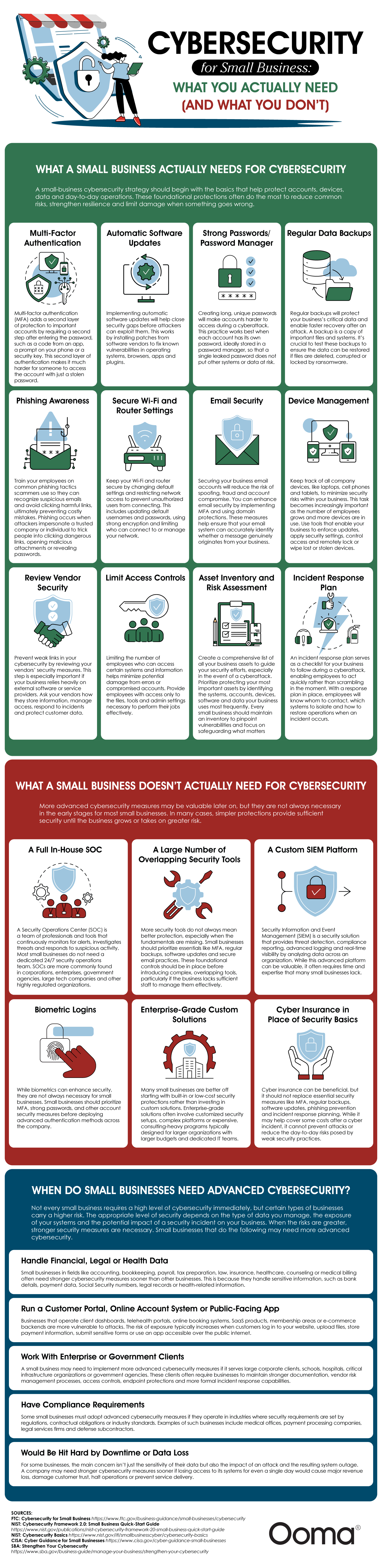
What a small business actually needs for cybersecurity
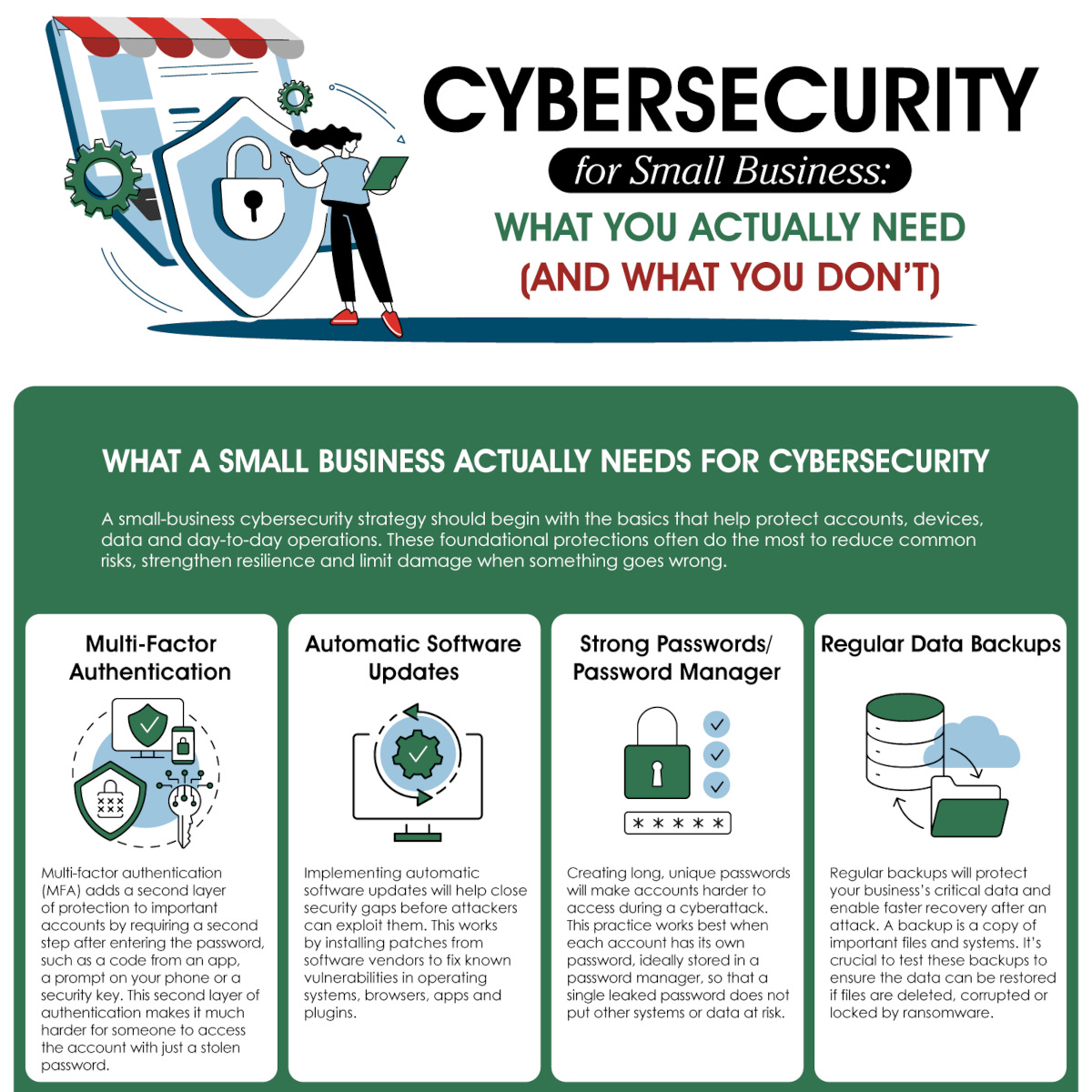
A small-business cybersecurity strategy should begin with the basics that help protect accounts, devices, data and day-to-day operations. These foundational protections often do the most to reduce common risks, strengthen resilience and limit damage when something goes wrong.
Multi-factor authentication
Multi-factor authentication (MFA) adds a second layer of protection to important accounts by requiring a second step after entering the password, such as a code from an app, a prompt on your phone or a security key. This second layer of authentication makes it much harder for someone to access the account with just a stolen password.
Automatic software updates
Implementing automatic software updates will help close security gaps before attackers can exploit them. This works by installing patches from software vendors to fix known vulnerabilities in operating systems, browsers, apps and plugins.
Strong passwords/password manager
Creating long, unique passwords will make accounts harder to access during a cyberattack. This practice works best when each account has its own password, ideally stored in a password manager, so that a single leaked password does not put other systems or data at risk.
Regular data backups
Regular backups will protect your business’s critical data and enable faster recovery after an attack. A backup is a copy of important files and systems. It’s crucial to test these backups to ensure the data can be restored if files are deleted, corrupted or locked by ransomware.
Phishing awareness
Train your employees on common phishing tactics scammers use so they can recognize suspicious emails and avoid clicking harmful links, ultimately preventing costly mistakes. Phishing occurs when attackers impersonate a trusted company or individual to trick people into clicking dangerous links, opening malicious attachments or revealing passwords.
Secure Wi-Fi and router settings
Keep your Wi-Fi and router secure by changing default settings and restricting network access to prevent unauthorized users from connecting. This includes updating default usernames and passwords, using strong encryption and limiting who can connect to or manage your network.
Email security
Securing your business email accounts will reduce the risk of spoofing, fraud and account compromise. You can enhance email security by implementing MFA and using domain protections. These measures help ensure that your email system can accurately identify whether a message genuinely originates from your business.
Device management
Keep track of all company devices, like laptops, cell phones and tablets, to minimize security risks within your business. This task becomes increasingly important as the number of employees grows and more devices are in use. Use tools that enable your business to enforce updates, apply security settings, control access and remotely lock or wipe lost or stolen devices.
Review vendor security
Prevent weak links in your cybersecurity by reviewing your vendors’ security measures. This step is especially important if your business relies heavily on external software or service providers. Ask your vendors how they store information, manage access, respond to incidents and protect customer data.
Limit access controls
Limiting the number of employees who can access certain systems and information helps minimize potential damage from errors or compromised accounts. Provide employees with access only to the files, tools and admin settings necessary to perform their jobs effectively.
Asset inventory and risk assessment
Create a comprehensive list of all your business assets to guide your security efforts, especially in the event of a cyberattack. Prioritize protecting your most important assets by identifying the systems, accounts, devices, software and data your business uses most frequently. Every small business should maintain an inventory to pinpoint vulnerabilities and focus on safeguarding what matters most.
Incident response plan
An incident response plan serves as a checklist for your business to follow during a cyberattack, enabling employees to act quickly rather than scrambling in the moment. With a response plan in place, employees will know whom to contact, which systems to isolate and how to restore operations when an incident occurs.
What a small business doesn’t actually need for cybersecurity
More advanced cybersecurity measures may be valuable later on, but they are not always necessary in the early stages for most small businesses. In many cases, simpler protections provide sufficient security until the business grows or takes on greater risk.
A full in-house SOC
A Security Operations Center (SOC) is a team of professionals and tools that continuously monitors for alerts, investigates threats and responds to suspicious activity. Most small businesses do not need a dedicated 24/7 security operations team. SOCs are more commonly found in corporations, enterprises, government agencies, large tech companies and other highly regulated organizations.
A large number of overlapping security tools
More security tools do not always mean better protection, especially when the fundamentals are missing. Small businesses should prioritize essentials like MFA, regular backups, software updates and secure email practices. These foundational controls should be in place before introducing complex, overlapping tools, particularly if the business lacks sufficient staff to manage them effectively.
A custom SIEM platform
Security Information and Event Management (SIEM) is a security solution that provides threat detection, compliance reporting, advanced logging and real-time visibility by analyzing data across an organization. While this advanced platform can be valuable, it often requires time and expertise that many small businesses lack.
Biometric logins
While biometrics can enhance security, they are not always necessary for small businesses. Small businesses should prioritize MFA, strong passwords and other account security measures before deploying advanced authentication methods across the company.
Enterprise-grade custom solutions
Many small businesses are better off starting with built-in or low-cost security protections rather than investing in custom solutions. Enterprise-grade solutions often involve customized security setups, complex platforms or expensive, consulting-heavy programs typically designed for larger organizations with larger budgets and dedicated IT teams.
Cyber insurance in place of security basics
Cyber insurance can be beneficial, but it should not replace essential security measures like MFA, regular backups, software updates, phishing prevention and incident response planning. While it may help cover some costs after a cyber incident, it cannot prevent attacks or reduce the day-to-day risks posed by weak security practices.
When do small businesses need advanced cybersecurity?
Not every small business requires a high level of cybersecurity immediately, but certain types of businesses carry a higher risk. The appropriate level of security depends on the type of data you manage, the exposure of your systems and the potential impact of a security incident on your business. When the risks are greater, stronger security measures are necessary.
Your small business may need more advanced security if you:
Handle financial, legal or health data
Small businesses in fields like accounting, bookkeeping, payroll, tax preparation, law, insurance, healthcare, counseling or medical billing often need stronger cybersecurity measures sooner than other businesses. This is because they handle sensitive information, such as bank details, payment data, Social Security numbers, legal records or health-related information.
Run a customer portal, online account system or public-facing app
Businesses that operate client dashboards, telehealth portals, online booking systems, SaaS products, membership areas or e-commerce backends are more vulnerable to attacks. The risk of exposure typically increases when customers log in to your website, upload files, store payment information, submit sensitive forms or use an app accessible over the public internet.
Work with enterprise or government clients
A small business may need to implement more advanced cybersecurity measures if it serves large corporate clients, schools, hospitals, critical infrastructure organizations or government agencies. These clients often require businesses to maintain stronger documentation, vendor risk management processes, access controls, endpoint protections and more formal incident response capabilities.
Have compliance requirements
Some small businesses must adopt advanced cybersecurity measures if they operate in industries where security requirements are set by regulations, contractual obligations or industry standards. Examples of such businesses include medical offices, payment processing companies, legal services firms and defense subcontractors.
Would be hit hard by downtime or data loss
For some businesses, the main concern isn’t just the sensitivity of their data but also the impact of an attack and the resulting system outage. A company may need stronger cybersecurity measures sooner if losing access to its systems for even a single day would cause major revenue loss, damage customer trust, halt operations or prevent service delivery.
Sources
Husain Sumra is a former journalist who reported on the biggest companies in tech, from Apple to Amazon, covering cloud services, consumer technology and communication solutions. His journalism background has helped him bring a customer-first approach to content marketing, creating pieces of content aimed at helping people.