


 Introducing
  ,
, 



This article contains additional advanced configuration information regarding the network connections associated with the Ooma system. A small minority of users will find this information useful for a special network setup.
- Table of Contents
Service Ports and Firewall Information
Ooma uses the following application ports for administrative data and voice traffic. Note that ports marked as local are for incoming firewall rules, while ports marked as remote are for outgoing firewall rules:
Telo Base Station or Phone Genie
- remote UDP/TCP 53, 1194, 1294
- remote TCP 80, 110, 443, 8883
- remote UDP 67, 123, 3480
- local UDP 49000 to 50000
- remote UDP 10000 to 20000
This port information can be useful if you have a special network configuration with a firewall device upstream of the Telo Base Station or Phone Genie that restricts application ports on the inside or “private side” of your network for outbound traffic. Firewalls are typically on by default for inbound traffic and no special modifications are required to allow that traffic through.
If you are installing the Ooma Telo Base Station or the Ooma Phone Genie for the first time and find the line 1 and line 2 buttons are illuminated, you may have a firewall on your router or modem preventing certain Ooma traffic from going through as shown in the example diagram below:
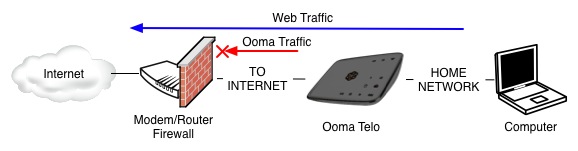
To verify you are running into this problem, connect a computer to the HOME port of the Ooma device. Using this computer, verify you can reach http://setup.ooma.com in a web browser. Next, try browsing to a public website (such as http://www.google.com or http://www.yahoo.com). If the web connection to the public website is successful, you may have a firewall blocking the Ooma service ports. You will need to configure your firewall policies to allow the Ooma data and voice ports listed above. For more information on configuring firewall policies, please refer to your modem/router user manual.
Reference: If you are having difficulty connecting to setup.ooma.com, please see our troubleshooting FAQ.
Encryption
All service traffic (including voice traffic) to and from the Ooma central servers is securely encrypted.
Note for Ooma systems used with landlines: Local calls are typically forwarded through your existing landline connection.