


 Introducing
  ,
, 



The second generation Ooma Telo Base Station and the Phone Genie are compatible with all Ooma add-on devices, while the first generation Telo Base Station is only compatible with select add-on devices. This article contains instructions to help you determine which generation of Telo Base Station you have and to help you make sure your add-on peripherals can be installed properly.
- Table of Contents
How can I tell which generation of the Ooma Telo Base Station I have?
You can determine which generation of the Ooma Telo Base Station you have by checking the activation code on the bottom of the device:
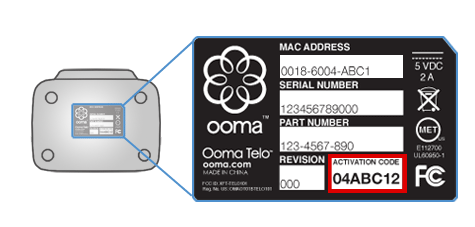
If your activation code begins with a 2 or higher, you have the second generation Telo Base Station. If your activation code begins with a 0 or a 1, you have a first generation Telo Base Station. In this case, you may wish to contact our Customer Care Team to begin the process of upgrading your Telo Base Station to a newer model.
Which Ooma add-ons are compatible with each generation of Telo Base Station?
The chart below outlines which add-ons are compatible with each generation of the Telo Base Station.
| First Gen. Telo Base Station | Second Gen. Telo Base Station or Phone Genie | |
 Ooma HD1 Handset | Yes | No |
 Ooma HD2 Handset | Yes | Yes |
 Ooma HD3 Handset | No | Yes |
 Ooma Linx | Yes | Yes |
 Ooma DP1 desk phone | No | Yes |
 Ooma Safety Phone | Yes | Yes |
 Ooma Smart Security Door and Window Sensor | No | Yes |
 Ooma Smart Security Water Sensor | No | Yes |
 Ooma Smart Security Motion Sensor | No | Yes |
 Ooma Smart Security Garage Door Sensor | No | Yes |
How can I change which add-ons my first generation Telo Base Station can pair with?
The type of add-on you synced with your Telo Base Station first will determine which group of devices your Telo Base Station is currently set up to use. You can update that preference by following the instructions in [this article](\home\why-cant-i-pair-new-accessories-with-my-ooma-telo).